Wednesday, October 14, 2020

Multiple Twitter accounts with the same Gmail address


Multiple Twitter accounts with the same Gmail address

There is a nice trick if you want to have multiple Twitter accounts and keep the same Gmail address, just add a dot in the address.

For example, considering your Gmail address is firstnamelastname@gmail.com, you can use many combinations:
  • firstname.lastname@gmail.com
  • first.namelastname@gmail.com
  • firstnamelast.name@gmail.com
Gmail just ignore the dots and it will forward the Twitter emails to your original email address firstnamelastname@gmail.com.

I hope this trick helps you!


Friday, October 9, 2020

Artificial Intelligence - Machine Learning - Spoken Digits Recognition


Spoken Digits Recognition

University of Toronto School of Continuing Studies

Term project for Machine Learning course

Group: Ankur Tyagi, Haitham Alamri, Rodolfo de Andrade Vasconcelos

Professor: Matthew MacDonald


Github:

https://github.com/ravasconcelos/spoken-digits-recognition 

Presentation

IMAGE ALT TEXT HERE

Business Problem

  • Inference of the digits as said by users on phone
  • Biometric authentication using speech dataset

Prerequisites

  1. if running locally, have Python 3.7 and Junyper installed

How to run

Local Jupyter Notebook

  1. clone this repository
  2. ensure you have the correct version of the Python libraries stated in the file src/lib_version Example:
python -m pip install -U <library>==<version>
  1. Run junyper nootebook
junyper notebook
  1. Open src/spoken-digits-recognition.ipynb or src/speaker-recognition.ipynb
  2. Run all Cells

Colab Jupyter Notebook

  1. Open
  2. Upload the CSV files
  3. Run all Cells

Contents

  • README.md: This file, explaining the project

  • UofT_Final_project.pdf: Project presentation in PDF format

  • UofT_Final_project.pptx: Project presentation in Power Point format

  • spoken_digits_comparison.pdf: Recordings comparisson for each digit for the six speakers

  • data/*: wav files with English spoken digits from 0 to 9

  • src/lib_version: Python libraries version used in this project

  • src/more_test.csv: Features of the files in data/recordings/moreSpeakersTest

  • src/more_train.csv: Features of the files in data/recordings/moreSpeakersTrain

  • src/speaker-recognition.ipynb: Junyper Notebook with Keras Neural Network model able to recognize the speaker of English digits (Jackson, Nicolas, Theo, Ankur, Caroline and Rodolfo)

  • src/speaker-recognition.pdf: PDF version of an execution of speaker-recognition.ipynb

  • src/spoken-digits-recognition.ipynb: Junyper Notebook with Neural Network model able to recognize English spoken digits

  • src/spoken-digits-recognition.pdf: PDF version of an execution of spoken-digits-recognition

  • src/test.csv: Features of the files in data/recordings/test

  • src/train.csv: Features of the files in data/recordings/train

Recording Data

The files stored in data/recordings/test and data/recordings/train were downloaded from FSDD [Ref 1 and 2]:

Ankur, Caroline and Rodolfo provided the recordings stored in data/recordings/moreSpeakersTest and data/recordings/moreSpeakersTrain

References

  1. https://github.com/Jakobovski/free-spoken-digit-dataset
  2. https://github.com/moebg/spoken-digit-recognition

Wednesday, October 7, 2020

Error installing Azure PowerShell - Nuget not installed

 If you get the error below when installing Azure PowerShell, see below how to fix it.


PS C:\windows\system32> Install-Module -Name Az -AllowClobber -SkipPublisherCheck


NuGet provider is required to continue

PowerShellGet requires NuGet provider version '2.8.5.201' or newer to interact with NuGet-based repositories. The NuGet

 provider must be available in 'C:\Program Files\PackageManagement\ProviderAssemblies' or

'C:\Users\XXXXXXXXX\AppData\Local\PackageManagement\ProviderAssemblies'. You can also install the NuGet provider by

 running 'Install-PackageProvider -Name NuGet -MinimumVersion 2.8.5.201 -Force'. Do you want PowerShellGet to install

and import the NuGet provider now?

[Y] Yes  [N] No  [S] Suspend  [?] Help (default is "Y"): Y

WARNING: Unable to download from URI 'https://go.microsoft.com/fwlink/?LinkID=627338&clcid=0x409' to ''.

WARNING: Unable to download the list of available providers. Check your internet connection.

PackageManagement\Install-PackageProvider : No match was found for the specified search criteria for the provider

'NuGet'. The package provider requires 'PackageManagement' and 'Provider' tags. Please check if the specified package

has the tags.

At C:\Program Files\WindowsPowerShell\Modules\PowerShellGet\1.0.0.1\PSModule.psm1:7468 char:21

+ ...     $null = PackageManagement\Install-PackageProvider -Name $script:N ...

+                 ~~~~~~~~~~~~~~~~~~~~~~~~~~~~~~~~~~~~~~~~~~~~~~~~~~~~~~~~~

    + CategoryInfo          : InvalidArgument: (Microsoft.Power...PackageProvider:InstallPackageProvider) [Install-Pac

   kageProvider], Exception

    + FullyQualifiedErrorId : NoMatchFoundForProvider,Microsoft.PowerShell.PackageManagement.Cmdlets.InstallPackagePro

   vider


PackageManagement\Import-PackageProvider : No match was found for the specified search criteria and provider name

'NuGet'. Try 'Get-PackageProvider -ListAvailable' to see if the provider exists on the system.

At C:\Program Files\WindowsPowerShell\Modules\PowerShellGet\1.0.0.1\PSModule.psm1:7474 char:21

+ ...     $null = PackageManagement\Import-PackageProvider -Name $script:Nu ...

+                 ~~~~~~~~~~~~~~~~~~~~~~~~~~~~~~~~~~~~~~~~~~~~~~~~~~~~~~~~~

    + CategoryInfo          : InvalidData: (NuGet:String) [Import-PackageProvider], Exception

    + FullyQualifiedErrorId : NoMatchFoundForCriteria,Microsoft.PowerShell.PackageManagement.Cmdlets.ImportPackageProv

   ider


WARNING: Unable to download from URI 'https://go.microsoft.com/fwlink/?LinkID=627338&clcid=0x409' to ''.

WARNING: Unable to download the list of available providers. Check your internet connection.

PackageManagement\Get-PackageProvider : Unable to find package provider 'NuGet'. It may not be imported yet. Try

'Get-PackageProvider -ListAvailable'.

At C:\Program Files\WindowsPowerShell\Modules\PowerShellGet\1.0.0.1\PSModule.psm1:7478 char:30

+ ... tProvider = PackageManagement\Get-PackageProvider -Name $script:NuGet ...

+                 ~~~~~~~~~~~~~~~~~~~~~~~~~~~~~~~~~~~~~~~~~~~~~~~~~~~~~~~~~

    + CategoryInfo          : ObjectNotFound: (Microsoft.Power...PackageProvider:GetPackageProvider) [Get-PackageProvi

   der], Exception

    + FullyQualifiedErrorId : UnknownProviderFromActivatedList,Microsoft.PowerShell.PackageManagement.Cmdlets.GetPacka

   geProvider


Install-Module : NuGet provider is required to interact with NuGet-based repositories. Please ensure that '2.8.5.201'

or newer version of NuGet provider is installed.

At line:1 char:1

+ Install-Module -Name Az -AllowClobber -SkipPublisherCheck

+ ~~~~~~~~~~~~~~~~~~~~~~~~~~~~~~~~~~~~~~~~~~~~~~~~~~~~~~~~~

    + CategoryInfo          : InvalidOperation: (:) [Install-Module], InvalidOperationException

    + FullyQualifiedErrorId : CouldNotInstallNuGetProvider,Install-Module


Ensure you are running Windows PowerShell as Administrator and try the command below:
[Net.ServicePointManager]::SecurityProtocol = [Net.SecurityProtocolType]::Tls12
Let me know if it fixed the Azure PowerShell for you as well.

Source: https://stackoverflow.com/questions/16657778/install-nuget-via-powershell-script


Sunday, October 4, 2020

Step-by-Step Tutorial: Springboot Hello Word application with Java 8 and Lombok

Step-by-Step Tutorial: Springboot Hello Word application with Java 8 and Lombok

Objective

In this tutorial, we will build a Springboot application with Java 8 and Lombok. 

Pre-requisites:

  • Java JDK 8
  • Maven
  • IntelliJ IDEA

Github:

The source code can be found at https://github.com/ravasconcelos/springboot-tutorials/tree/main/1-springboot-hello-world .


Hands-on:

Create the project:

Start IntelliJ IDEA and click in Create New Project.


Project settings:

Preferably, select a JDK 8 as "Project SDK". In my case, I am using a JDK 11.
Choose the default starter service URL.


Enter the following information:
  • Group: com.ravasconcelos
  • Artifact: hello-world
  • Type: Maven Project
  • Language: Java
  • Packaging: Jar
  • Java Version: 8
  • Name: hello-world
  • Description: A Hello World REST Service using Java 8 and Lombok.


Select the libraries you want to be included in the project.

From "Developer Tools", we will choose: 
  • Spring Boot DevTools
  • Lombok
  • Spring Configuration Processor


From "Web", we will choose: 
  • Spring Web Services


Set the Project name and the location. Click in the Finish button.


Project Created:

You will have the Spring Application class created for you.

After the project is created it will look like this.


Creating the Controller and the Model:

Let's first create a package for the controller class.

Right-click the com.ravasconcelos.helloworld package. Select "New", then "Package".

Enter the name "controllers".


Create the controller class right-clicking the "controllers" package.

Select "New" then "Java Class".

Enter HelloWorldController as the class name.


The created class will look like this.


Follow the same steps and create a model class.

Name the package as "model" and the class name as "HelloWorldModel".


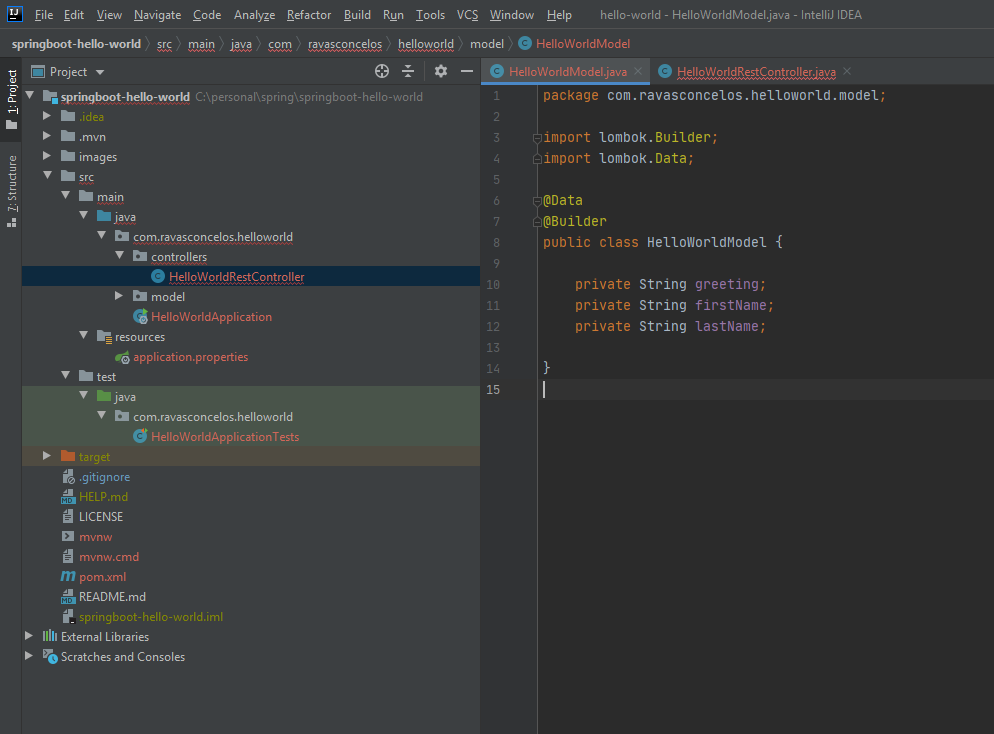
Add the Lombok annotations Data and Builder.

Create the fields:
  • greeting
  • firstName
  • lastName
It should look like this.


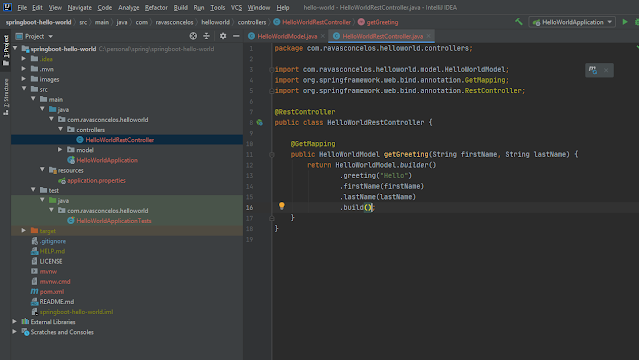
Let's go back to our controller class and add the RestController annotation.

Create the "getGreeting" method and annotate it with "GetMapping".

Return the model class populated with the input parameter and "Hello" as the "greeting".


Running:

Believe it or not we are done.

We can now run the server clicking in the play icon at the top right.


If you see the message log below, everything worked well and you can test it, as the next sub-chapter.


Testing:

Using Postman, curl or your HTTP Client of choice you can send a GET request passing the firstName and the lastName as query parameters.

The response is the JSON payload we have created in the model class. 


Conclusion:

Using Springboot you can develop prototypes and real REST-based applications pretty quickly leveraging the Spring framework libraries.

If you found this tutorial useful, please write a comment.

If some of the steps have not worked for you, let me know and I'll do my best to help you.

Wednesday, March 11, 2020

How to delete/drop an user schema in Oracle

alter session set "_oracle_script"=true;

drop user <USER_SCHEMA> cascade;

Example:
drop user myUserSchema cascade;

Tuesday, February 25, 2020

POSTMAN - How to save a response field as a variable

In the "Tests" tab, use the code below:

var jsonData = JSON.parse(responseBody);
postman.setEnvironmentVariable("myId", jsonData.id);

It will save the id field in the JSON response payload to the variable myId. The variable can be used in another request this way: {{myId}}

Friday, February 21, 2020

POSTMAN - How to use random number in the request

Just use the variable randomInt, for example:
In the request:
{
    "id": "{{$randomInt}}"
}

In the pre-request Script:
postman.setEnvironmentVariable("myId", "MY_ID_"+ _.random(1,99999));
console.log(postman.getEnvironmentVariable("myId"));
Read this link for more information: https://learning.postman.com/docs/postman/variables-and-environments/variables/

Monday, March 5, 2018

How to restart Oracle

Shutdown

$ sqlplus '/ as sysdba'
SQL> shutdown

Options:
shutdown - waits for sessions end
shutdown immediate - rollbacks and ends sessions (waits for rollback finish)
shutdown abort - kills everything - usually database has to perform some recovery on startup.

Startup

$ sqlplus '/ as sysdba'
SQL> startup

References:
https://dba.stackexchange.com/questions/42774/how-to-quickly-startup-shutdown-oracle-11
https://docs.oracle.com/cd/E17781_01/server.112/e18804/startup.htm#ADMQS124
https://www.cyberciti.biz/faq/how-do-i-start-oracle-service-in-unix/

Monday, February 5, 2018

How to enable Tomcat to list files

It is called Directory Listing.

Tomcat default web.xml must be changed: $CATALINA_BASE/conf/web.xml

<servlet>
        <servlet-name>default</servlet-name>
        <servlet-class>
          org.apache.catalina.servlets.DefaultServlet
        </servlet-class>
        <init-param>
            <param-name>debug</param-name>
            <param-value>0</param-value>
        </init-param>
        <init-param>
            <param-name>listings</param-name>
            <param-value>true</param-value>
        </init-param>
        <load-on-startup>1</load-on-startup>
    </servlet>


Reference: https://tomcat.apache.org/tomcat-7.0-doc/default-servlet.html

Friday, January 26, 2018

Create and extract a .tar.gz archive using command line


To create a tar.gz archive from a given folder you can use the following command:

tar -zcvf tar-archive-name.tar.gz source-folder-name

This will compress the contents of source-folder-name to a tar.gz archive named tar-archive-name.tar.gz

To extract a tar.gz compressed archive you can use the following command:

tar -zxvf tar-archive-name.tar.gz

This will extract the archive to the folder tar-archive-name.

To Preserve permissions:

tar -pcvzf tar-archive-name.tar.gz source-folder-name

Switch the ‘c’ flag to an ‘x’ to extract (uncompress):

tar -pxvzf tar-archive-name.tar.gz

Reference:
https://popoleodesigns.com/create-and-extract-a-tar-gz-archive-using-command-line/

Friday, January 19, 2018

How do I find all files containing specific text on Linux?

grep -rnw '/path/to/somewhere/' -e 'pattern'  
or

    grep -r YOUR_PATTERN .
or
find /path/to/somewhere -type f -exec grep -H 'text-to-find-here' {} \;

Reference:
https://stackoverflow.com/questions/16956810/how-do-i-find-all-files-containing-specific-text-on-linux

Wednesday, December 26, 2012

1Z0-895 Java Platform, Enterprise Edition 6 Enterprise JavaBeans Developer Certified Expert Exam


I passed in Oracle EJB Developer certification.

I studied the book EJB 3 In Action (http://www.amazon.com/EJB-3-Action-Debu-Panda/dp/1933988347). No need to study JPA chapters. The problem with this book is that it is about EJB 3 only, so it is necessary to study EJB 3.1 topics in another sources. This book is not so good, but it is starting point.

After reading the book I started doing mocks. I used Enthuware (http://enthuware.com/index.php/mock-exams/oracle-certified-expert/oceejbd-ejb-6). It is excellent and very similar as the exam.

As doubts were emerging during the mock I studied JSR 318 (http://jcp.org/en/jsr/detail?id=318). The JSR is not good to be used as initial source of learning, it is not a teaching document, but it is the best source of information.

The study method I have adopted is to learn by repetition. I did the initial mock and four standards mocks. For every mock, I did it by the first time, after reviewed all questions and then retraced the mock. The first time the grade was always low, but repeating grade was high.

The time it takes to make the mock by the first time is around 2 hours. The review needs 3 to 4 hours because that's when you really study. Repeating the mock takes 1 hour because you are already dominating the subject. It is important not to memorize the answers, but rather try to explain them.

To cover all topics of exam is necessary to make all the 4 standards mocks because the distribution of the questions is not 100%.

When finished doing the mocks, redid the questions I never hit (neither the first nor the repetition) for all mocks. It has a feature for this in Enthuware software.

I passed with 90% and I was pleased with the time spent to study.

Good luck in your studies.

How to limit the number of records returned in a SQL query


There is no a SQL standard to limit the number of records returned in a query, ie, each vendor implements this functionality in its own way.

Here's a summary on how to do this for some vendors:

DB2 -- select * from table fetch first 10 rows only 
Informix, InterBase/Firebird, SKIP  -- select first 10 * from table 
Microsoft SQL Server and Access -- select top 10 * from table 
MySQL, PostgreSQL, SQLite, HSQL/H2 -- select * from table limit 10 
Oracle -- select * from table where rownum <= 10

Oracle Note:
If the query has "group by" or "order by" rownum must be supplied:

Ex:
SELECT a, b, c
FROM
( SELECT a, b, c, ROWNUM rn
FROM
( SELECT a, b, c FROM RECORD 
WHERE AVAIL='Y"
ORDER BY DATE DESC
)
WHERE ROWNUM <= 25
)
WHERE rn >= 21;

References:


Wednesday, March 14, 2012

How to encrypt using MD5 with a Java code example

Using the code bellow it is possible to generate a MD5 Hash related to strings:


    public static String encrypt(String sign) {   
    
        try {   
           java.security.MessageDigest md =   
              java.security.MessageDigest.getInstance("MD5");   
           md.update(sign.getBytes());   
           byte[] hash = md.digest();   
           StringBuffer hexString = new StringBuffer();   
           for (int i = 0; i < hash.length; i++) {   
              if ((0xff & hash[i]) < 0x10)   
                 hexString.append(   
                    "0" + Integer.toHexString((0xFF & hash[i])));   
              else   
                 hexString.append(Integer.toHexString(0xFF & hash[i]));   
           }   
           sign = hexString.toString();   
        }   
        catch (Exception nsae) {   
           nsae.printStackTrace();   
        }   
        return sign;   
     }  


Here you have a MD5 Hash Generator online:
http://www.miraclesalad.com/webtools/md5.php

Wednesday, January 18, 2012

How to show only one header in sqlplus

When you have to use sqlplus and want to avoid showing table header each n rows returned, you can use the command bellow to show only one header:


set pagesize 0   -- only one header row

Another useful commands:
set colsep ,     -- separate columns with a comma
set trimspool on -- remove trailing blanks
set headsep off  -- this may or may not be useful...depends on your headings.
set linesize X   -- X should be the sum of the column widths

sqlplus reference: http://psoug.org/reference/sqlplus.html
How to create a csv file from sqlplus output: http://stackoverflow.com/questions/643137/how-do-i-spool-to-a-csv-formatted-file-using-sqlplus


Wednesday, January 4, 2012

How to generate Java classes for Hibernate from MySql database tables using Eclipse Indigo


  1. Install JBoss Tools on Eclipse using update site
    In Eclipse Indigo, on menu bar, click Help / Install new Software
    Paste this address in Work with text field and click Add... http://download.jboss.org/jbosstools/updates/development/indigo/
    The mandatory plugin is JBoss Data Services / Hibernate tools, but it is good to install all of them
  2. Create a Hibernate Configuration
    Open Hibernate Perspective
    In Hibernate Configurations panel, right click in a empty space and go to Add Configuration
    In Project field, select the project where Java classes will be created.
    In Database Connection combo box select an existent MySql connection or create a new one clicking on New button.
    In Property file field, click in Setup / Create new
    In Configuration file field, click in Setup / Create new
    Click OK
  3. Run Hibernate Code Generation
    Edit hibernate.cfg.xml file. Remove name property on session-factory tag. Let it with no attributes.
    Add hibernate-tools.jar to the project classpath. It can be found at <eclipse installation folder>\plugins\org.jboss.tools.hibernateextension4_0_3.4.0.v20111213-1944-H40-M5\lib\tools
    On Hibernate perspective, on menu bar, click Run / Hibernate Code Generation /  Hibernate Code Generation Configurations
    In Console configuration, select the just created configuration
    In Output directory, select the source root folder
    In Package, type desired package
    In revenge.xml, click Setup / Create new
    In reveng. strategy, Browse to the class org.hibernate.cfg.reveng.DefaultReverseEngineeringStrategy
    Click Run button
  4. Check generated classes out
    Open Java EE perspective
    Refresh project files
    See that entity and DAO classes were generated

Tuesday, December 20, 2011

Auto generated ID's for MySql and Oracle using Hibernate

Here you have auto generated ID's examples using Hibernate with Oracle and MySql databases.

Oracle

...

@Entity
@Table(name = "grupo")
public class Grupo implements GenericModel {


@Id
@GeneratedValue(strategy = GenerationType.SEQUENCE, generator = "GRUPO_ID_SEQ")
@SequenceGenerator(name = "GRUPO_ID_SEQ", sequenceName = "GRUPO_ID_SEQ", allocationSize = 1)
@Column(nullable=false)
private Long id_grupo;

...

Sequence GRUPO_ID_SEQ must exist in Oracle database.


Considering that MySql does not have sequences, if you try to use the code above with MySql you will get a runtime exception:


Caused by: org.hibernate.MappingException: Dialect does not support sequences
at org.hibernate.dialect.Dialect.getSequenceNextValString(Dialect.java:619)
at org.hibernate.id.SequenceGenerator.configure(SequenceGenerator.java:88)
at org.hibernate.id.SequenceHiLoGenerator.configure(SequenceHiLoGenerator.java:66)
at org.hibernate.id.IdentifierGeneratorFactory.create(IdentifierGeneratorFactory.java:127)

MySQL


...
@Entity
@Table(name = "grupo")
public class Grupo implements GenericModel {


@Id
@GeneratedValue
@Column(nullable=false)
private Long id_grupo;
...

The field id_grupo must be marked as auto increment in MySql.


Monday, December 12, 2011

I PASSED: 1Z0-894 Oracle Certified Expert Java Platform, Enterprise Edition 6 JavaServer Pages and Servlet Developer


I did the test on 09/12 and got through!

I was taking 70% in Mocks and hoped to pass with a score about 75% or 80%, but the test was harder than I expected and I passed with 68%.

As I had posted October, 1st, I based my studies on EPractize Labs Study Guide and Mock Exam, because I had already read Katy Sierra's book Head First J2EE1.4 sometimes on other occasions. Also I read in a Servlet 3.0 spec.

I really do not recommend EPractize Labs. The Study Guide is very superficial and Mock has many errors. In addition, the Mock is not consistent with the real exam. The real exam does not cover almost anything about custom tags and it covers much of the Servlet 3.0 spec, but Mock is upside down.

I believe Piotr's web page (http://piotrnowicki.com/2011/03/jee-6-scwcd-mock-questions/) saved me. It has 67 questions focused on the Servlet 3.0 specification. Enthuware Mock also helped a lot (http://enthuware.com/index.php/mock-exams/oracle-certified-expert/oce-jsp-servlet-mock-questions).

This Mock is cheaper and the quality of it is infinitely greater. The proof is that in addition to being 100% Test Pass Garantee, they return the money if you find three errors. Many exam questions were very similar to those on Mock.

My tip for anyone to prepare for this test is:

* Study the book Head First Servlets & JSP, Second Edition (JEE5): http://shop.oreilly.com/product/9780596516680.do?green=25526262438&cmp=af-mybuy-9780596516680.IP 
* Study the JSR-315 Spec Servlets 3.0: http://jcp.org/aboutJava/communityprocess/mrel/jsr315/index.html 
* Answering the questions of Piotr
* Make Enthuware Mock Exams

Following these steps with time, for sure you will do better than me :-)

Good studies!

Thursday, November 10, 2011

Telnet on Windows Vista


On Start menu, click on "Run..." option, then write "optionalfeatures" (without quotes) and click OK button.


"Windows Features" window will open so you can enable Telnet Client feature. Click OK and wait some minutes (MANY MINUTES in my case) while the features are been enabled.


When it is finished you have to restart the system before having fun with Telnet Client.

Tuesday, November 1, 2011

How to find UtcTimeOffsetCode table in TAP3 files

One of the information in Moc (Mobile Originated Calls) and Mtc (Mobile Terminated Calls) is Call Event Start Time Stamp.

It is formed by Local Time Stamp (yyyyMMddhhmmss) plus Utc Time Offset Code.

Utc Time Offset Code (5F-81-68) can be any integer from 0 to 99 and with this information you will be able to discover the Utc Time Offset (5F-81-67).


The problem is this information is not standardized for all TAP files, it is an information self-contained in TAP3 file, in another section. In other words, each file has its own Utc Time Offset Code list, mapping codes to real offsets.

This table is named Utc Time Offset Info and is located in Network Information section. Utc Time Offset Info can have one or more Utc Time Offset Definition and each Definition has the mapping between Utc Time Offset Code to Utc Time Offset.


In the example shown in pictures above, the offset code 65 (0x41) was linked to Utc Time Offset -05:00.

TAP3 protocol was designed this way to minimize the amount of data transferred and to avoid the repetition of
frequently identical information at the call/event level.

Tip:
Nice programs to work with TAP3 files:
TAP3 Editor (http://www.combil.com/tap3ed2.htm): Used to see structured information
ASN1VE (http://www.obj-sys.com/asn1-viewer.php): Used to see binary content of ASN.1 data